Welcome › Forums › Forums › Getting Help with Nvivo – Scroll to end to post a question › Best Mac Software to download to use Windows version of NVivo
- This topic has 6 replies, 2 voices, and was last updated 9 hours, 54 minutes ago by
 Pennycoughlan.
-
AuthorPosts
-
19th May 2026 at 7:45 am #16579PennycoughlanParticipant
Hi,
I’m working off a Mac but I’m collaborating with a team of people who are using Windows machines. I don’t have access to a Windows machine so I was wondering if you could provide any advice on the best software to download so that I can open the Windows file on my Mac. The IT desk suggested Parallels (https://www.parallels.com/) but they couldn’t provide any guidance on whether it was good or bad and didn’t suggest any alternatives. Do you have any advice?
Thanks,
Penny
19th May 2026 at 3:58 pm #16582QDATRAINING_Admin
KeymasterHi Penny,
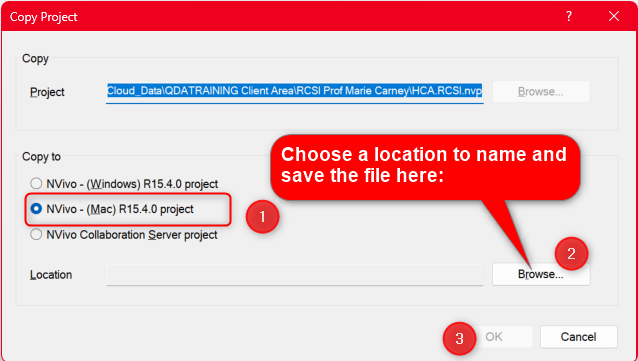
You don’t need to install any software to open a Windows NVivo project file on a MAC. You just need the Windows user to save their project file as a MAC. If they do ‘File>Copy Project>’ and chose the MAC option in the dialogue box, the file will save as a MAC file which you can then just open on your MAC. I hope this response is helpful, but do let me know if you have any questions or concerns.
 19th May 2026 at 4:12 pm #16583PennycoughlanParticipant
Thanks so much for your help and the instructions. An additional issue is that as there are a team of us all working on the same project and we are all editing at different times so it feels like it would be much easier to just save the file as a Windows file so that it didn’t have to keep changing formats. I was also advised that it was better to use the Windows version rather than the Mac version because of the additional functionality.
19th May 2026 at 4:45 pm #16584KeymasterHi Penny,
You are correct that the Windows version is better to use, both for greater functionality and ease of use. You are also correct that there is a risk in constantly converting files because conversions can and do fail. I would not recommend Windows Parallels because it involves partitioning your hard and drive and splitting memory between the operating systems. The best option is a virtual Windows machine, which you can access via your browser on the MAC. You get to keep all your resources intact while still being able to work on the MAC while accessing the full functionality of Windows. If you have access to a Windows device anywhere, you can access it free using Google Chrome Desktop, and you are in business. You can also rent virtual machines at reasonable cost which would give you the same thing.
20th May 2026 at 8:14 am #16585PennycoughlanParticipantThanks so much, this is really helpful. Unfortunately I don’t have access to a Windows machine at all so I think I would need to rent a virtual machine. Are there any services that you would recommend?
20th May 2026 at 4:38 pm #16587KeymasterHi Penny,
Here are some links to such services:
- Windows 365 Cloud PC
- Shadow PC
- Paperspace Virtual Machines
- Azure Virtual Desktop
- Vultr Windows Cloud Compute
- Kamatera Windows VPS
- IONOS Windows VPS
- Amazon AWS EC2 Windows Instances
- Google Cloud Windows VMs
- OVHcloud Windows VPS
I would recommend Windows 365 as the simplest and smoothest option.
21st May 2026 at 8:28 am #16588PennycoughlanParticipantThank you!
-
AuthorPosts
- You must be logged in to reply to this topic.